<?xml version="1.0" encoding="utf-8"?>
<feed xmlns="http://www.w3.org/2005/Atom">
  <title>Shane Weng&#39;s Blog</title>
  
  
  <link href="/atom.xml" rel="self"/>
  
  <link href="http://www.shaneweng.com/"/>
  <updated>2019-01-22T17:42:11.000Z</updated>
  <id>http://www.shaneweng.com/</id>
  
  <author>
    <name>Shane Weng</name>
    
  </author>
  
  <generator uri="http://hexo.io/">Hexo</generator>
  
  <entry>
    <title>An Introduction To MarkView</title>
    <link href="http://www.shaneweng.com/2017/09/28/an-introdcution-to-markView/"/>
    <id>http://www.shaneweng.com/2017/09/28/an-introdcution-to-markView/</id>
    <published>2017-09-28T07:00:00.000Z</published>
    <updated>2019-01-22T17:42:11.000Z</updated>
    
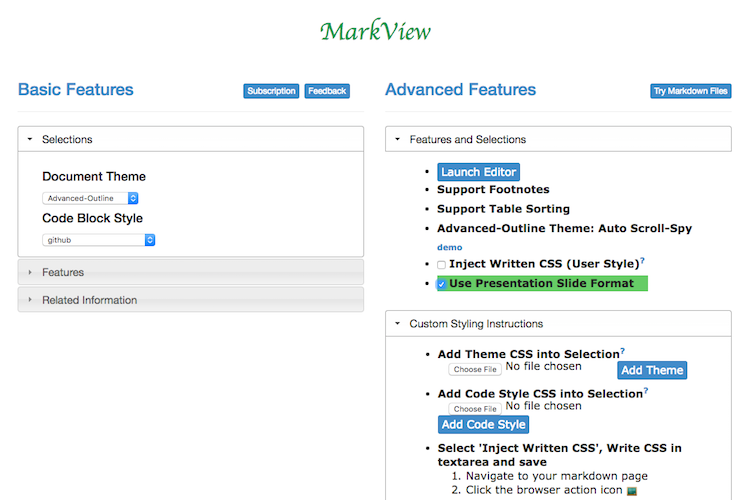
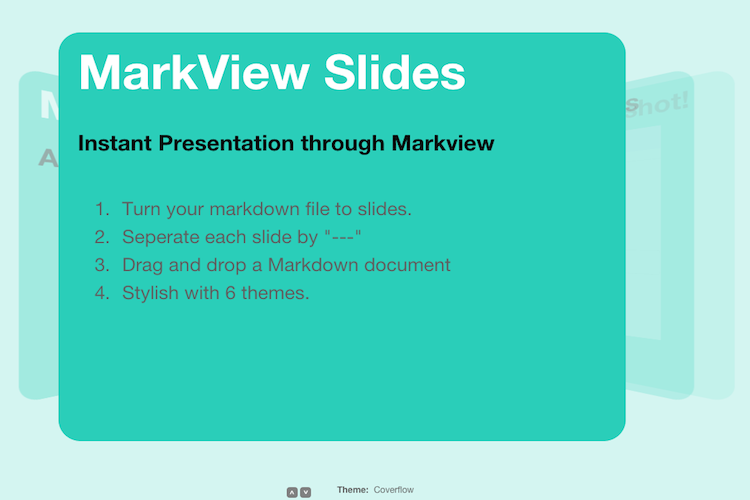
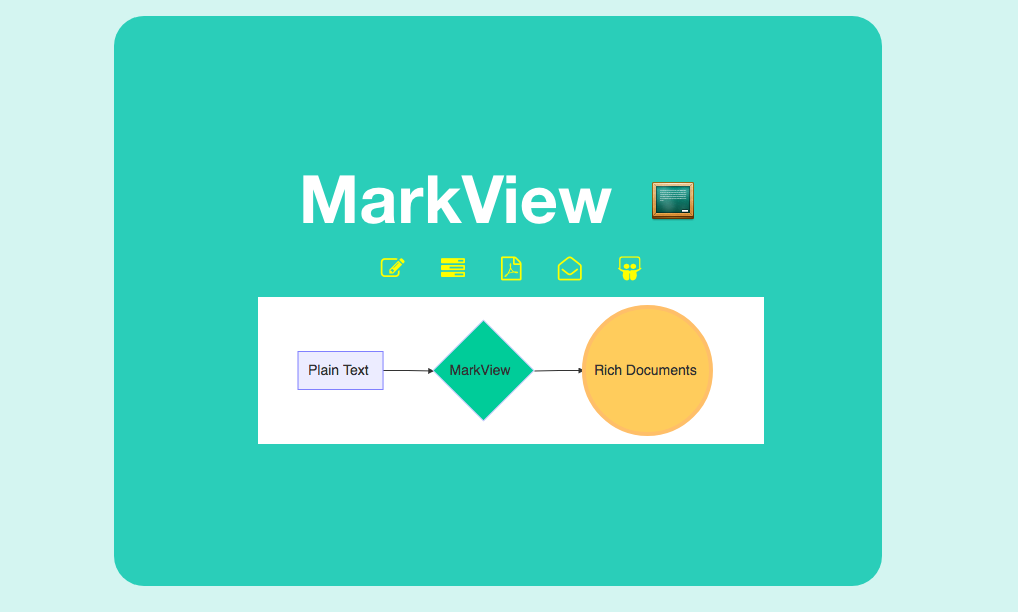
    <content type="html"><![CDATA[<p>Read and Write Awesome Markdown Files, provide content outline, sortable tables and code block syntax highlight with line number. Easy to select document theme and code block styling, access markdown editor, sorting table, write and display presentation slides…</p><a id="more"></a><p><img src="/assets/images/dia8.png" alt="dia8"></p><h2 id="about-markview">About MarkView</h2><p>MarkView is a Chrome extension for reading markdown file with<br>an outline view, support multiple table format styles, code block syntax<br>highlight and <a href="https://help.github.com/articles/github-flavored-markdown" target="_blank" rel="external">Github Flavored Markdown</a>. MarkView also come with a great built-in text editor, so user can write Markdown file on the web.<br><br></p><iframe width="420" height="315" src="https://www.youtube.com/embed/GhLN1m2NeUY?autoplay=false" frameborder="0" allowfullscreen></iframe><p><a href="http://v.youku.com/v_show/id_XNjM0MjI1NTI4.html" target="_blank">Same Video on YouKu</a></p><h2 id="markview-features">MarkView Features</h2><ul><li>View markdown file as a web page (html format)</li><li>Auto reload local file when file is changed (Post-installation: select ‘Allow access to file URLs’ option in chrome://extensions/)</li><li>Show outline in scrollable table of content</li><li>Support Github Flavored Markdown table styles and code highlight.</li><li>Built-in Markdown Editor</li><li>Support footnotes, table sorting, tasklist, emoji</li><li>Convert Markdown file to slides presentation</li><li>Support User custom styling</li></ul><h2 id="markview-installation">MarkView Installation</h2><ul><li><p>Install From <a href="https://chrome.google.com/webstore/detail/markview/iaddkimmopgchbbnmfmdcophmlnghkim" target="_blank" rel="external">Chrome Web Store</a></p></li><li><p>Install From <a href="http://www.baiyunconsulting.com/projects/markview/download/index.html" target="_blank" rel="external">Project Web Page</a></p></li></ul><h2 id="markview-in-action">MarkView In Action</h2><p>Try our samples after installing MarkView!</p><ul><li><p><a href="http://shaneweng.com/projects/markview/tests/sample-basic.md" target="_blank" rel="external">View Markdown File</a><br>Note: Unchecked slide format on chrome-extension://iaddkimmopgchbbnmfmdcophmlnghkim/options.html</p></li><li><p><a href="http://shaneweng.com/projects/markview/tests/sample-footnotes.md" target="_blank" rel="external">View Footnotes</a></p></li><li><p><a href="http://shaneweng.com/projects/markview/tests/sample-custom-style.md" target="_blank" rel="external">View Custom Style</a><br>Note: enter &quot; * {color: red;} &quot; in custom area and save before you try.</p></li><li><p><a href="http://www.baiyunconsulting.com/markview-sample-advanced-outline.html" target="_blank" rel="external">View Advanced-outline Theme in HTML Sample</a></p></li><li><p><a href="http://shaneweng.com/projects/markview/tests/sample-slides.md" target="_blank" rel="external">View Slide File</a><br>Note: Checked slide format on chrome-extension://iaddkimmopgchbbnmfmdcophmlnghkim/options.html</p></li></ul><h2 id="screenshopts">Screenshopts</h2><div class="figure left fig-33" style="width:;"><a class="fancybox" href="https://raw.githubusercontent.com/swcool/swcool.github.io/master/assets/images/byc/options-750x500.png" title="Options page" data-fancybox-group="markview" target="_blank" rel="external"><img class="fig-img" src="https://raw.githubusercontent.com/swcool/swcool.github.io/master/assets/images/byc/options-750x500.png" alt="Options page"></a><span class="caption">Options page</span></div><div class="figure center fig-33" style="width:;"><a class="fancybox" href="https://raw.githubusercontent.com/swcool/swcool.github.io/master/assets/images/byc/editor-750x500.png" title="Text Editor" data-fancybox-group="markview" target="_blank" rel="external"><img class="fig-img" src="https://raw.githubusercontent.com/swcool/swcool.github.io/master/assets/images/byc/editor-750x500.png" alt="Text Editor"></a><span class="caption">Text Editor</span></div><div class="figure right fig-33" style="width:;"><a class="fancybox" href="https://raw.githubusercontent.com/swcool/swcool.github.io/master/assets/images/byc/slides-750x500.png" title="Slide Presentation" data-fancybox-group="markview" target="_blank" rel="external"><img class="fig-img" src="https://raw.githubusercontent.com/swcool/swcool.github.io/master/assets/images/byc/slides-750x500.png" alt="Slide Presentation"></a><span class="caption">Slide Presentation</span></div><div style="clear:both"><h2 id="references">References</h2><ul><li><a href="http://www.baiyunconsulting.com/portfolio-markview.html" target="_blank" rel="external">MarkView Project site</a></li><li><a href="http://www.baiyunconsulting.com/blog/markview/markdown-cheat-sheet/" target="_blank" rel="external">Basic Markdown Cheat Sheet</a></li><li>About Markdown, see <a href="http://daringfireball.net/projects/markdown/" target="_blank" rel="external">project site</a></li><li><a href="https://help.github.com/articles/github-flavored-markdown" target="_blank" rel="external">Github Flavored Markdown</a></li></ul></div>]]></content>
    
    <summary type="html">
    
      &lt;p&gt;Read and Write Awesome Markdown Files, provide content outline, sortable tables and code block syntax highlight with line number. Easy to select document theme and code block styling, access markdown editor, sorting table, write and display presentation slides…&lt;/p&gt;
    
    </summary>
    
      <category term="web" scheme="http://www.shaneweng.com/categories/web/"/>
    
    
      <category term="markdown" scheme="http://www.shaneweng.com/tags/markdown/"/>
    
      <category term="chrome" scheme="http://www.shaneweng.com/tags/chrome/"/>
    
  </entry>
  
  <entry>
    <title>Jekyll Theme Landing Page</title>
    <link href="http://www.shaneweng.com/2017/09/26/jekyll-theme-landing-page/"/>
    <id>http://www.shaneweng.com/2017/09/26/jekyll-theme-landing-page/</id>
    <published>2017-09-26T07:00:00.000Z</published>
    <updated>2017-09-27T15:20:28.000Z</updated>
    
    <content type="html"><![CDATA[<p>Simple and elegant web page theme. Landing page is a responsive website landing page theme for Jekyll Bootstrap. Fixed top navigation menu, easy to integrate with other sections inside the page, provide single and multiple languages support.</p><a id="more"></a><br><img src="https://raw.githubusercontent.com/BaiyunGroup/landing-page-theme/master/img/screenshot.png" width="640px" height="400px"><h2 id="features">Features</h2><ul><li>Navigation bar is on the fixed top</li><li>Social buttons icons are customizable</li><li>Fully responsive content sections with Bootstrap</li><li>Jekyll theme, easy to add/remove content through divided sections</li><li>Easy to deploy on Github for free hosting</li></ul><h2 id="demo-and-project-page">Demo and project page</h2><p>You can see demo and project page on Baiyun Consulting Group <a href="http://www.baiyunconsulting.com/portfolio-landpage.html" target="_blank" rel="external">Landing Page Project Portfolio</a></p><h2 id="open-source">Open Source</h2><h4 id="landing-page-iframe-src-http-ghbtns-com-github-btn-html-user-swcool-repo-landing-page-theme-type-watch-count-true-allowtransparency-true-frameborder-0-scrolling-0-width-110-height-20-iframe">Landing Page <iframe src="http://ghbtns.com/github-btn.html?user=swcool&repo=landing-page-theme&type=watch&count=true" allowtransparency="true" frameborder="0" scrolling="0" width="110" height="20"></iframe></h4><p>Landing page Jekyll theme is open source project, you can find it on github <a href="https://github.com/swcool/landing-page-theme" target="_blank" rel="external">landing page</a>. Landing-Page theme is a services theme that allows you to showcase your services/products/portfolio. You can also see this theme listed on Jekyll themes gallery in <a href="http://jekyllthemes.org/themes/landing-page/" target="_blank" rel="external">here</a>.</p><h4 id="contribute-iframe-src-http-ghbtns-com-github-btn-html-user-swcool-repo-landing-page-theme-type-fork-count-true-allowtransparency-true-frameborder-0-scrolling-0-width-95-height-20-iframe">Contribute <iframe src="http://ghbtns.com/github-btn.html?user=swcool&repo=landing-page-theme&type=fork&count=true" allowtransparency="true" frameborder="0" scrolling="0" width="95" height="20"></iframe></h4><p>Start by <a href="https://github.com/swcool/landing-page-theme/fork" target="_blank" rel="external">forking</a> this repository.</p><h4 id="contact-iframe-src-http-ghbtns-com-github-btn-html-user-swcool-type-follow-allowtransparency-true-frameborder-0-scrolling-0-width-156-height-20-iframe">Contact <iframe src="http://ghbtns.com/github-btn.html?user=swcool&type=follow" allowtransparency="true" frameborder="0" scrolling="0" width="156" height="20"></iframe></h4><p>Feel free to <a href="https://github.com/swcool/landing-page-theme/issues/new" target="_blank" rel="external">open issues</a> if you run into trouble or have suggestions.<br>Pull Requests always welcome.</p><h2 id="need-extra-service">Need Extra Service</h2><p>Baiyun Consulting Group provides custom/modification services on this great theme. Services such as adding support for multiple languages, adding contact form, google map and so on. <a href="https://www.baiyunconsulting.com/contact.html#contact" target="_blank" rel="external">Contact us</a> if you need.</p><p><br><br><br><em>Feel free to Tweet, Share to Google+ or Leave a Comment here!</em></p>]]></content>
    
    <summary type="html">
    
      &lt;p&gt;Simple and elegant web page theme. Landing page is a responsive website landing page theme for Jekyll Bootstrap. Fixed top navigation menu, easy to integrate with other sections inside the page, provide single and multiple languages support.&lt;/p&gt;
    
    </summary>
    
      <category term="web" scheme="http://www.shaneweng.com/categories/web/"/>
    
    
      <category term="theme" scheme="http://www.shaneweng.com/tags/theme/"/>
    
      <category term="jekyll" scheme="http://www.shaneweng.com/tags/jekyll/"/>
    
  </entry>
  
  <entry>
    <title>Managing Your Dotfiles to Utilize Your System</title>
    <link href="http://www.shaneweng.com/2017/09/25/managing-your-dotfiles-to-utilize-your-system/"/>
    <id>http://www.shaneweng.com/2017/09/25/managing-your-dotfiles-to-utilize-your-system/</id>
    <published>2017-09-25T07:00:00.000Z</published>
    <updated>2017-09-27T03:02:29.000Z</updated>
    
    <content type="html"><![CDATA[<p>In order to backup, restore, and sync the prefs and settings for my toolbox, I create a repository includes all of my custome dotfiles. By the time I created this repository, I recognized that my dotfiles are the most important files on my machine.</p><a id="more"></a><p><a class="fancybox" href="http://dotfiles.github.io/images/dotfiles-logo.png" title="Caption" data-fancybox-group="" target="_blank" rel="external"><img class="fig-img" src="http://dotfiles.github.io/images/dotfiles-logo.png" style="width:75%;" alt="Caption"></a></p><p>These repository dotfiles<sup class="footnote-ref"><a href="#fn1" id="fnref1">[1]</a></sup> are for setup the system enviornment in Mac OS.</p><h2 id="installation">Installation</h2><ol start="0"><li><p>Backup your home original dotfiles if you need.</p></li><li><p>Get the repository whereever you want. I like to keep in ~/Projects/dotfiles</p><pre><code> git clone https://github.com/swcool/dotfiles.git</code></pre></li><li><p>Using homebrew to install apps such as zsh, tmux, git, and vim</p><pre><code> cd dotfiles; setup/homebrew.sh</code></pre></li><li><p>Symlink to dotfiles to home directory as <code>~/.*</code></p><pre><code> setup/create_symlink.sh</code></pre></li><li><p>Start using your dotfiles’ apps</p></li></ol><h2 id="repository-structure">Repository Structure</h2><ul><li>bin/   -  Utility executable scripts, should be copy to ~/bin/</li><li>git/   -  Git related dotfiles and other configuration files.</li><li>setup/ -  Installation files for dotfiles’ apps</li><li>tmux/  -  Tmux related dotfiles.</li><li>vim/   -  Vim  related dotfiles and other configuration files.</li><li>zsh/   -  ZSH related dotfiles, aliases and other files.</li></ul><h2 id="awesome-dotfiles">Awesome Dotfiles</h2><ul><li>A curated list of dotfiles resources, the reference project is<br><a href="https://github.com/webpro/awesome-dotfiles" target="_blank" rel="external">Awesome Dotfiles</a>.</li><li>A list of Github Popular <a href="https://github.com/search?q=topic%3Adotfiles&amp;type=Repositories" target="_blank" rel="external">Dotfiles repositories</a>.</li><li><a href="http://dotfiles.github.io" target="_blank" rel="external">dotfiles.github.io</a> - Your unofficial<br>guide to dotfiles on GitHub.</li></ul><hr class="footnotes-sep"><section class="footnotes"><ol class="footnotes-list"><li id="fn1" class="footnote-item"><p><a href="https://github.com/swcool/dotfiles" target="_blank" rel="external">https://github.com/swcool/dotfiles</a> <a href="#fnref1" class="footnote-backref">↩</a></p></li></ol></section>]]></content>
    
    <summary type="html">
    
      &lt;p&gt;In order to backup, restore, and sync the prefs and settings for my toolbox, I create a repository includes all of my custome dotfiles. By the time I created this repository, I recognized that my dotfiles are the most important files on my machine.&lt;/p&gt;
    
    </summary>
    
      <category term="system" scheme="http://www.shaneweng.com/categories/system/"/>
    
    
      <category term="dotfiles" scheme="http://www.shaneweng.com/tags/dotfiles/"/>
    
      <category term="git" scheme="http://www.shaneweng.com/tags/git/"/>
    
  </entry>
  
  <entry>
    <title>Close Popup Window in Chrome Extension</title>
    <link href="http://www.shaneweng.com/2014/07/20/close-popup-window-in-chrome/"/>
    <id>http://www.shaneweng.com/2014/07/20/close-popup-window-in-chrome/</id>
    <published>2014-07-20T07:00:00.000Z</published>
    <updated>2017-09-27T03:02:29.000Z</updated>
    
    <content type="html"><![CDATA[<p>On JULY 16, 2014 WEDNESDAY, Chrome release its version 36.0.1985.125 which fixed some security related issues. Here is the <a href="http://googlechromereleases.blogspot.com/2014/07/stable-channel-update.html" target="_blank" rel="external">Release note</a>.</p><p>According to the releas note, the new version contains a number of fixes and improvements, including:</p><a id="more"></a><blockquote><p>Rich Notifications Improvements<br>An Updated Incognito / Guest NTP design<br>The addition of a Browser crash recovery bubble<br>Chrome App Launcher for Linux<br>Lots of under the hood changes for stability and performance</p></blockquote><br>It also said:<blockquote><p>This update includes 26 security fixes. Below, we highlight fixes that were either contributed by external researchers or particularly interesting. Please see the Chromium security page for more information.</p></blockquote><p>From my observation, this update fixed the issue on using <code>window.close()</code> to close the popup window. You will see this in the console when it fail, “Scripts may close only the windows that were opened by it.”</p><p>So, in the previous Chrome released builds, the below code block may worked but not with this update.</p><figure class="highlight javascript"><table><tr><td class="gutter"><pre><div class="line">1</div><div class="line">2</div></pre></td><td class="code"><pre><div class="line"><span class="built_in">window</span>.open(<span class="string">''</span>, <span class="string">'_self'</span>, <span class="string">''</span>);</div><div class="line"><span class="built_in">window</span>.close();</div></pre></td></tr></table></figure><p>Above is to open a new window with about:blank to replace the current page, then close it. From this Chrome update, you have to update your code accordingly to close the popup window. One of the solution is to grab the popup window id and use</p><figure class="highlight javascript"><table><tr><td class="gutter"><pre><div class="line">1</div></pre></td><td class="code"><pre><div class="line">chrome.windows.remove(integer windowId, <span class="function"><span class="keyword">function</span> <span class="title">callback</span>)</span></div></pre></td></tr></table></figure><p>method to remove it. Chrome extension windows API can be found at <a href="https://developer.chrome.com/extensions/windows" target="_blank" rel="external">chrome.windows</a>.</p><p><code>chrome.windows.remove</code> is Chrome extension API, javascript program should be recognized by chrome extension. You can try by putting it inside background.js, in your chrome extension manifest.json you need to have:</p><figure class="highlight javascript"><table><tr><td class="gutter"><pre><div class="line">1</div><div class="line">2</div><div class="line">3</div><div class="line">4</div></pre></td><td class="code"><pre><div class="line"><span class="string">"background"</span>: &#123;</div><div class="line">  <span class="string">"scripts"</span>: [<span class="string">"background.js"</span>],</div><div class="line">  ...</div><div class="line">&#125;,</div></pre></td></tr></table></figure><p>In the past, a great discussion around this window close issue can be found at <a href="http://stackoverflow.com/questions/19761241/window-close-and-self-close-do-not-close-the-window-in-chrome" target="_blank" rel="external">stackoverflow</a>.</p><p>Actually my chrome extension <a href="https://chrome.google.com/webstore/detail/markview/iaddkimmopgchbbnmfmdcophmlnghkim" target="_blank" rel="external">MarkView</a> was facing this issue and I had to update my code to make it work for this Chrome Update. By the way, MarkView is tool to read and write Awesome Markdown Files, it provides features including Content Outline, Sortable Tables and code block syntax highlight with line number.</p><p>Update: Due to the design changes, MarkView no longer use popup window<br>for login, user won’t see the action of “close popup window” in current version of MarkView.</p>]]></content>
    
    <summary type="html">
    
      &lt;p&gt;On JULY 16, 2014 WEDNESDAY, Chrome release its version 36.0.1985.125 which fixed some security related issues. Here is the &lt;a href=&quot;http://googlechromereleases.blogspot.com/2014/07/stable-channel-update.html&quot; target=&quot;_blank&quot; rel=&quot;external&quot;&gt;Release note&lt;/a&gt;.&lt;/p&gt;
&lt;p&gt;According to the releas note, the new version contains a number of fixes and improvements, including:&lt;/p&gt;
    
    </summary>
    
      <category term="web" scheme="http://www.shaneweng.com/categories/web/"/>
    
    
      <category term="chrome" scheme="http://www.shaneweng.com/tags/chrome/"/>
    
  </entry>
  
</feed>